VPN Server Hardware: Which VPS to Pick and How Much It Can Handle
The server is the most clear-cut expense of all in a VPN service, and the most common question after "which panel should I install." Our calculator has no servers at all, and that's not an oversight: the panel and configs are a one-time cost, while the VPS is paid every month and grows along with your audience. Below is what you won't find in hosting providers' blogs: how much traffic a live service moves, what the server runs into first, and what that costs per month.
Short answer
To validate demand, one VPS with a port of 1 Gbps or more and a generous traffic allowance is enough: CPU and memory don't matter at this stage. A service with hundreds of subscribers hits the channel and traffic limit first, then the CPU. The nodes of a live service move 79 TiB per month, which is about 270 Mbps on average across all servers, and there are more than ten servers there from different providers.
A server for yourself and a server for subscribers are different jobs
If you were searching for "free VPN server" or "server address," this isn't the place for you: this is about a server you rent yourself so you can sell access to it.
A VPN for yourself is one VPS, a config from the docs, and an hour of setup. When it goes down, you'll SSH in and fix it. A server for subscribers differs in one thing: there are people behind it who paid and don't know what SSH is. Everything else follows from that: redundancy, limits, multiple providers, monitoring. We covered the layers of the service as a whole in the article "Your own VPN service: how to build one and what you need to launch"; here we're only talking about hardware.
How much traffic a live service moves
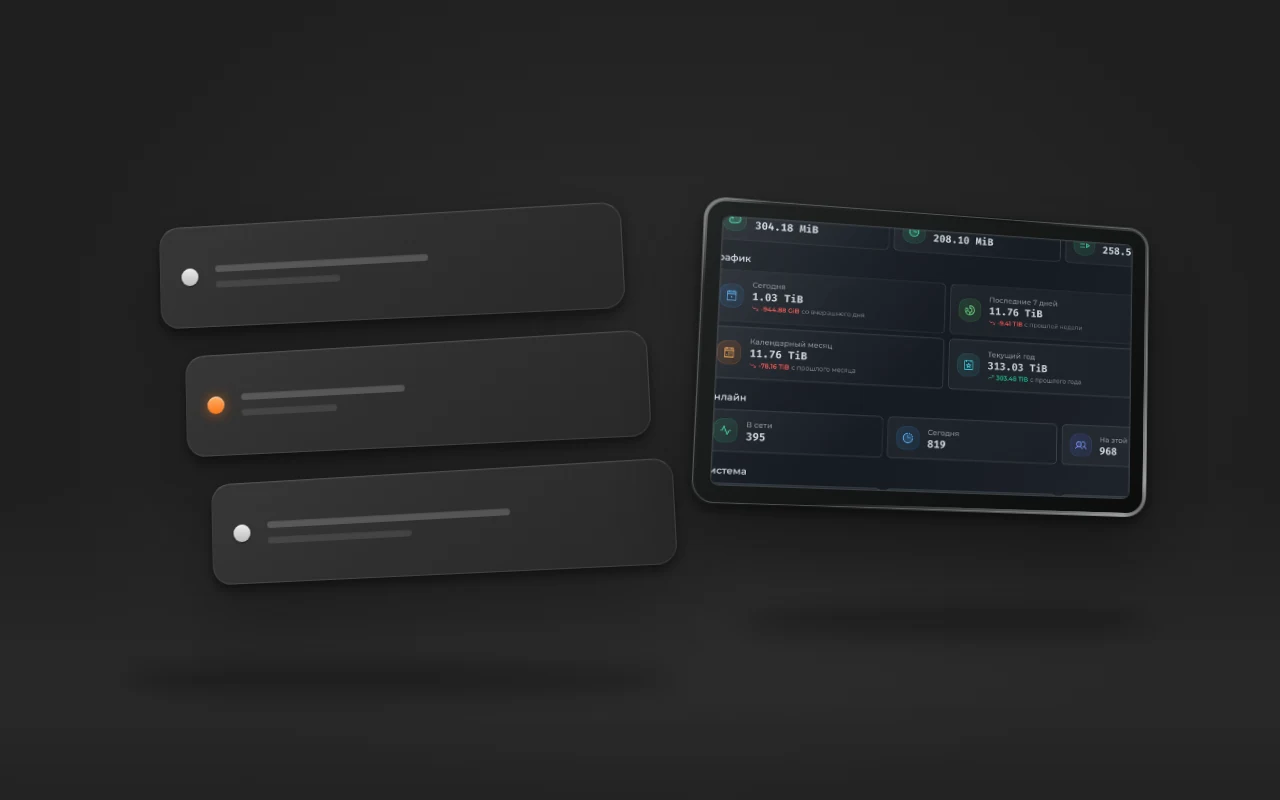
The home page of the Remnawave panel for a live service. The same screenshot appeared in the article about running your own VPN service; now let's look at it in terms of load.

Traffic over 30 days is 79.03 TiB, over 7 days 11.76 TiB. At the moment of the screenshot, 395 people were online; 968 logged in over the week. There are 680 connections on the nodes: one person often keeps two or three devices connected.
Let's convert that into bandwidth: a hosting provider sells megabits per second, while it only caps terabytes per month.
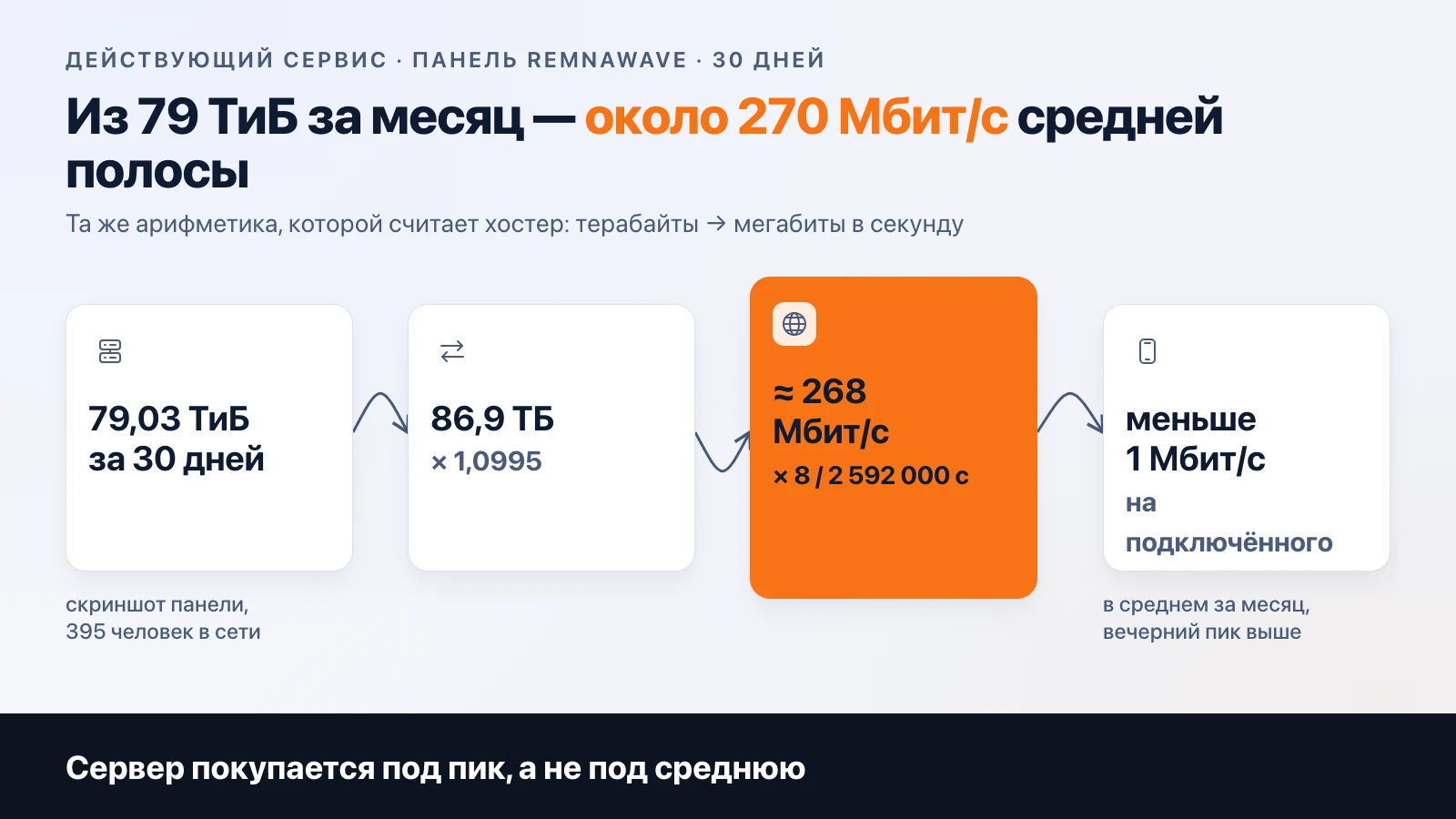
79.03 TiB is 86.9 TB in decimal terabytes, which is how hosting providers count. A month has 2,592,000 seconds. 86.9 TB × 8 bits / 2,592,000 s ≈ 268 Mbps. That's the average bandwidth across all nodes at once, around the clock. Per connected user, it works out to less than a megabit on average.
And this is where the "2 GB of RAM is enough for 50 users" tables break down. A monthly average and a Monday evening are different numbers. At night traffic drops severalfold, in the evening people watch video, and the peak goes far above the average. You buy a server for the peak. What your coefficient will be depends on your audience, and the only way to find out is from your own graphs after a month of operation.
What the server runs into first
At a live service the order is like this, and it hasn't changed in a year.

The channel is first. A 100 Mbps port runs out at the first few dozen active connections if there are 4K video fans among them. A 1 Gbps port is a normal starting point—and even then, check whether it's guaranteed or "up to."
Second is the traffic limit in the plan. Many plans measure it in terabytes per month, and at a volume of 79 TiB per month, such a server would exhaust its limit in a day or two. Unlimited or a limit in the tens of terabytes is the only option for a node with users on it.
Third is the CPU. VLESS with Reality is lightweight, but at hundreds of simultaneous connections, encryption and routing start to put a noticeable load on the core. That's the moment to split one node into two instead of buying a more powerful CPU.
Memory comes last. A panel on a separate machine wants its own resources (Remnawave, according to the community, at least 2 GB), while the node itself runs comfortably on the same 2 GB. The service has never hit a memory limit before a bandwidth limit.
What to check in a plan before paying
- Port: 1 Gbps and whether it's guaranteed. The wording "up to 1 Gbps" means that at peak you'll get less.
- The monthly traffic limit and what happens when you exceed it: extra charges, throttling, or disconnection. Throttling is worse than disconnection: the service technically works, but people leave.
- The provider's rules. Some providers ban public proxies in their terms; you read that before paying, not after an email from the abuse department.
- Payment method and currency. If the server isn't paid for in rubles, currency exchange losses get added to the economics; for a live service, that's a separate expense line.
- How quickly a copy of the server can be spun up with the same provider. When a node goes down, that's the only thing that will matter.
Why More Than Ten Providers
You could take one big 10 Gbps server and run everything on it. A live service doesn't do that, and load isn't the reason.
One provider is one point of failure. It can raise prices, change the rules, get a complaint and shut your server down within an hour. When your nodes live with different hosting providers, one going down means moving some users to a neighboring node instead of taking the service offline. That's what the panel is for: it gives the user a single subscription link, and you decide which servers stand behind it.
The second reason is geography. A node in one country works better for some services, a node in another for others. With ten servers you can tune this; with one you can't.
The price of this setup is bookkeeping. Ten invoices, ten control panels, ten payment dates. That's part of the work the calculator calls "Admin."
What It Costs per Month
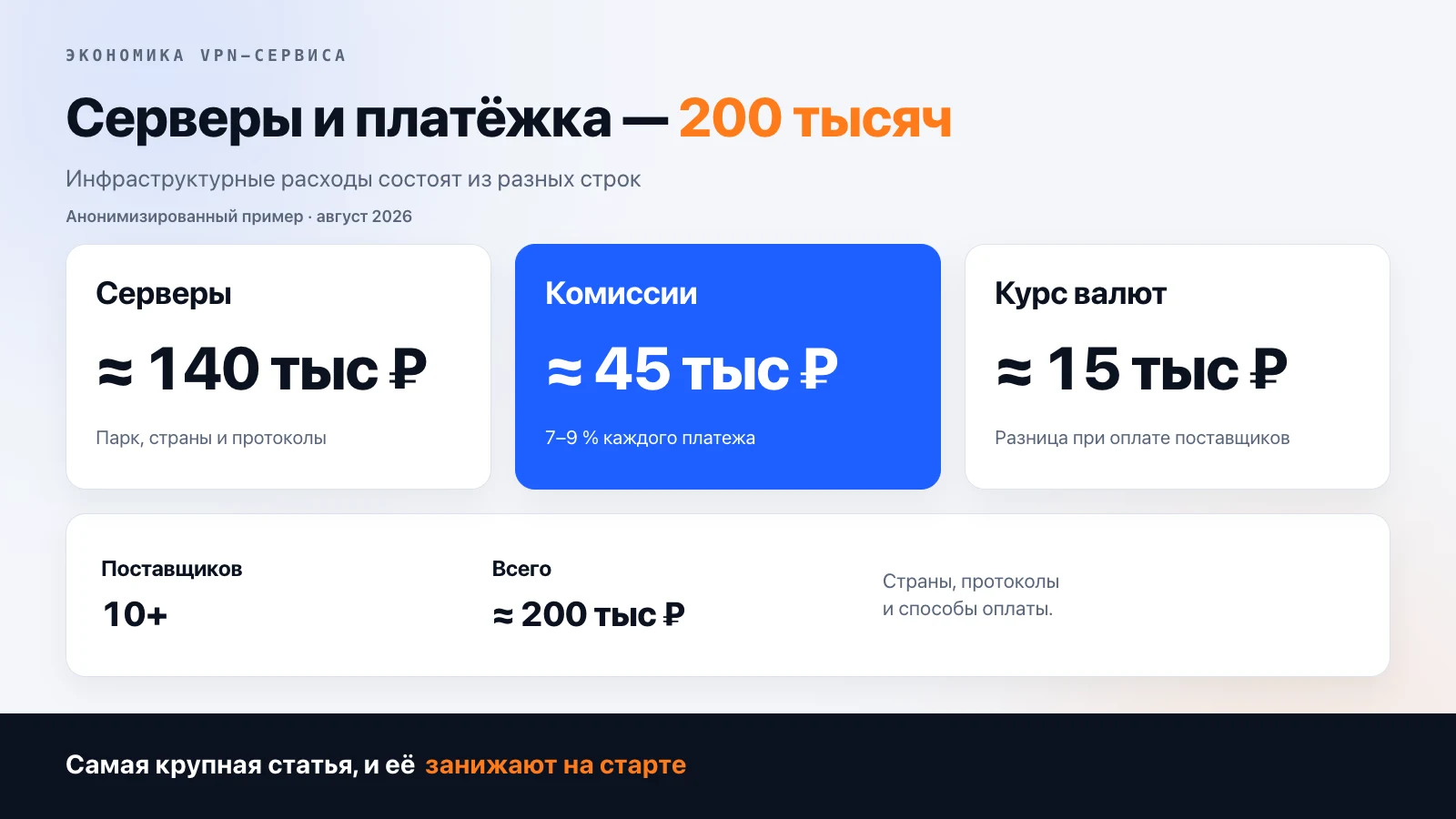
In the article “How Much a VPN Service Earns” we broke down the economics line by line. Servers there come to about 140 thousand rubles a month across ten-plus providers. That's on the order of 10 thousand rubles per server on average, with a wide spread between cheap and expensive nodes.
You don't need that figure to get started. A single 1 Gbps VPS with a generous allowance costs noticeably less than any line in the calculator, and for the first few months it will sit idle. Servers only start costing money once people show up, and that's good news: expenses grow along with revenue, not ahead of it.
What doesn't grow with revenue is setup. The panel, configs for Russian carrier networks, routing: that's done once and shows up in the calculator as two lines, "VPN Panel Setup" and "PRO Setup for Russia." You add servers yourself later, one at a time, when the graphs in the panel start hitting the ceiling.
FAQ
How many users can one VPS handle? It depends on bandwidth, not the number of accounts. A live service averages under a megabit per connected user, but evening load is many times higher than the average. You have to size for peak.
What matters more: CPU or bandwidth? Bandwidth and the traffic limit hit the wall first. CPU starts getting in the way at hundreds of concurrent connections; memory almost never does.
Can I start with a single server? Yes, to test demand. You need a second one as a backup.
Is that kind of server suitable for a router? Any VPS with a single config will work for a home router. That's a "VPN for personal use" job.
Why aren't servers in the calculator? The calculator covers development and setup, one-time costs. Servers are monthly and depend on your audience.
Servers aren't included in the calculator. Panel and carrier config setup is included, and there you can see what it costs next to the other lines.
Frequently asked
How many users can one VPS handle?
It depends on bandwidth, not the number of accounts. A live service averages under a megabit per connected user, but evening load is several times higher than average. You have to size for the peak, not the monthly average.
What matters more for a VPN server: CPU or bandwidth?
Bandwidth and the traffic limit hit their limits first. CPU starts to get in the way at hundreds of simultaneous connections; memory almost never does.
Can you start a VPN service with a single server?
To test demand, yes. A second server is needed as a backup: if the provider shuts down the first one, the service shouldn't go down with it.
Is a VPS suitable for a VPN on a router?
Any VPS with a single config will work for a home router. That's a "VPN for yourself" task; this article is about a service with subscribers.
Why aren't servers included in the VPN service calculator?
The calculator covers development and setup, which are one-time costs. Servers are paid for every month and depend on your audience, not on the amount of work.
Related articles
Your own VPN service: how to build it and what you need to launch
How to build your own VPN service to sell: the client, configs, a backend with payments, support. Why stock configs don't survive in Russia, and what the App Store requires.
Your Own App or Happ: What to Give VPN Service Customers
Happ is free and installs in a minute, but it keeps getting pulled from the Russian App Store. Your own app can take months to pass review. What to give subscribers, and when.
Taking payments in a Telegram bot: Stars, YooKassa, SBP, or crypto
How to take subscription payments in a Telegram bot: Telegram's rule on Stars, YooKassa and Tribute fees, and crypto. How people actually pay in our bot.